

Buy Now Free
- Level Intermediate
- المدة 2 ساعات hours
-
Offered by

عن
Dans ce cours de 2 heures, basé sur un projet, vous découvrirez les conteneurs et l'outil Docker, vous prendrez connaissance de l'intérêt des conteneurs puis vous apprendrez à créer et gérer des images et conteneurs Docker. A la fin de ce projet guidé, vous serez en mesure de: - Comprendre les conteneurs et Docker - Exécuter les commandes de base de Docker - Créer un Dockerfile et créer une image customisée à partir d'un Dockerfile - Lancer un conteneur Docker - Manipuler des images et conteneurs Docker - Lier des ports de conteneurs à des ports de la machine hôte - Créer des volumes Docker et persister les données de conteneurs - Copier des données entre une machine et un conteneur - Utiliser les variables d'environnement Docker - Connecter des conteneurs dans un réseau - Créer une image Docker à partir d'un conteneur - Sauvegarder une image Docker dans un fichier archive et la restaurer Ce projet guidé est recommandé aux développeurs, administrateurs systèmes et réseaux, aspirants au métier de DevOps, et à toute personnes intéressée à la conteneurisation.Auto Summary
Explore the world of containerization with the course "Initiation aux conteneurs avec Docker." Aimed at enhancing your personal development skills, this intermediate-level course offers a practical, project-based approach to understanding and utilizing Docker containers. Over the span of 2 hours, you'll delve into the significance of containers, learn to create and manage Docker images and containers, and gain hands-on experience in this essential technology. Available for free on Coursera, this course is perfect for those looking to expand their technical expertise in a concise, accessible format. Whether you're a developer, IT professional, or tech enthusiast, this course will equip you with valuable skills to advance your career.
Buy Now Free
- Level Beginner
- المدة 3 ساعات hours
-
Offered by
عن
Dans ce cours d'une heure, basé sur un projet, vous apprendrez les commandes de base de création et manipulation d'un cluster Swarm, des noeuds et des services, comment créer et manager un cluster avec Docker Swarm, comment déployer une stack Multi-services dans le cluster. A la fin de ce projet guidé, vous serez en mesure de: - Comprendre ce qu'est Docker Swarm et son fonctionnement - Utiliser les commandes de base de Docker Swarm et de gestion des services Docker - Initialiser un cluster avec Docker Swarm - Ajouter un nœud Worker à un cluster Swarm - Déployer un service Docker simple dans un cluster Swarm - Déployer une stack de services Docker dans un cluster Swarm et observer les logs - Mettre à l'échelle des services Docker dans un cluster Docker Swarm - Visualiser graphiquement les nœuds du cluster et les services déployés - Retirer et supprimer des nœuds d'un cluster Swarm Ce projet guidé est recommandé aux personnes ayant besoin de comprendre comment créer un cluster Docker Swarm et y déployer des services Docker. Des connaissances de base préalable de Docker et Docker compose sont recommandées pour profiter au maximum de ce projet guidé.Auto Summary
Explore the essentials of container orchestration with the "Initiation à Docker Swarm pour l'orchestration de conteneurs" course. Perfect for beginners in the realm of personal development, this one-hour, project-based course will guide you through the fundamental commands for creating and managing a Docker Swarm cluster, nodes, and services. You will learn how to efficiently deploy a multi-service stack within the cluster, gaining practical skills in cluster management with Docker Swarm. Offered on Coursera, this course is available for free, making it an accessible and valuable resource for anyone looking to enhance their technical proficiency in container orchestration. Dive in and start mastering Docker Swarm today!
Buy Now Free

- Level Beginner
- المدة 2 ساعات hours
-
Offered by
عن
Dans ce cours d'une heure, basé sur un projet, vous apprendrez les bases du service de stockage en cloud Amazon EFS. A la fin de ce projet guidé, vous serez en mesure de: - Comprendre le fonctionnement de Amazon S3 - Créer un système de fichiers Amazon EFS - Monter le système de fichiers Amazon EFS sur différentes instances EC2 Linux simultanément - Partager des données entre différents clients Linux par le biais du système de fichiers Amazon EFS - Configurer le montage automatique d'un système de fichiers Amazon EFS sur dans une instance Amazon EC2 Linux Ce projet guidé est recommandé à toute personne souhaitant apprendre à utiliser le service de stockage cloud AWS EFS de Amazon. Un compte Amazon AWS est donc indispensable pour la réalisation de ce projet guidé. Les ressources exploitées dans ce projet guidé sont couvertes par l'offre gratuite de Amazon AWS.Auto Summary
Dive into the essentials of Amazon Elastic File System (EFS) with this engaging one-hour, project-based course designed for beginners in personal development. Guided by Coursera, this course offers a hands-on experience where you'll master the basics of Amazon's cloud storage service, EFS. By the end of the course, you'll be proficient in creating and mounting Amazon EFS on multiple Linux EC2 instances, sharing data seamlessly between different Linux clients, and configuring automatic mounting on Amazon EC2 instances. Ideal for anyone looking to enhance their cloud storage skills, this course also requires an Amazon AWS account. Enjoy the benefits of learning with resources covered by Amazon AWS's free tier. Start your journey towards becoming an AWS EFS expert today, all at no cost!
Buy Now Free

- Level Intermediate
- المدة 3 ساعات hours
-
Offered by
عن
Dans ce projet guidé d'une heure, vous apprendrez les Indices de base de données, qui fait référence à un type spécial de structure de données qui accélère la récupération des enregistrements d'une table de base de données. A la fin de ce cours nous aurons appris à créer et exploiter l’index.Auto Summary
Enhance your personal development with "Indices de base de données expliqués," a guided one-hour project on Coursera. Learn about the specialized data structures that accelerate database record retrieval. Perfect for intermediate learners, this free course is expertly designed to boost your database management skills.
Buy Now Free
- Level Intermediate
- المدة 3 ساعات hours
-
Offered by
عن
Dans ce cours d'une heure, basé sur un projet, vous apprendrez comment lire toutes sortes de données et les importer dans R, y compris des fichiers CSV, des fichiers Excel, des données provenant d'autres logiciels statistiques, du Web et de bases de données relationnelles. Remarque : ce cours fonctionne le mieux pour les étudiants basés en Amérique du Nord. Nous nous efforçons actuellement d'apporter la même expérience dans d'autres régions.Auto Summary
"Importer des Données dans R" is an engaging one-hour, project-based course designed for intermediate learners in the personal development domain. Taught by Coursera, this course focuses on reading and importing various data types into R, including CSV files, Excel files, data from other statistical software, web data, and relational databases. Subscription is free, making it accessible for all.

ChatGPT for Beginners: Save time with Microsoft Excel
Take your Excel productivity to the next level by learning how to leverage the capabilities of ChatGPT, regardless of whether you are an Excel amateur or seasoned power-user. Over the span of this course, you will learn how to effectively standardize, extract, classify, and generate data through the combined power of Excel and ChatGPT.
Buy Now Free
- Level Intermediate
- المدة 3 ساعات hours
- الطبع بواسطة Coursera
-
Offered by
عن
Take your Excel productivity to the next level by learning how to leverage the capabilities of ChatGPT, regardless of whether you are an Excel amateur or seasoned power-user. Over the span of this course, you will learn how to effectively standardize, extract, classify, and generate data through the combined power of Excel and ChatGPT. Through hands-on projects and real-world scenarios, you will gain practical experience in creating standardized datasets, writing formulas for data cleaning and classification, extracting text from URLs, conducting sentiment analysis, and generating dummy data for surveys. This course offers a unique opportunity to explore the potential of combining AI capabilities with common business challenges faced within Excel. Basic knowledge of Excel is recommended to make the most of this course.الوحدات
Your Learning Journey
-
 9
Videos
9
Videos
-
 3
Readings
3
Readings
-
 1
Plugin
1
Plugin
-
 1
Lab
1
Lab
-
 1
Assignment
1
Assignment
 1
Assignment
1
Assignment
- Assess Your Knowledge
 1
Labs
1
Labs
- [Optional] Access Your GPT GenAI Playground
9
Videos
- Welcome to the course and getting setup
- Standardize Date Formatting Using ChatGPT
- Write Formulas to Clean Up Categorical Data
- Extract Text Data from URLs within ChatGPT
- (Practice Activity) Extract Text Data from Product Codes Using Formulas
- Conduct Sentiment Analysis with ChatGPT
- (Practice Activity) Write Formulas to Classify Data into Categories
- Generate Dummy Data with ChatGPT for a Survey
- Cumulative Challenge: Global Coffee Producers
3
Readings
- Project Overview
- [Optional] The GPT Generative AI Lab Playground
- Accessing Your Project Files
Auto Summary
Elevate your Excel productivity with the "ChatGPT for Beginners: Save time with Microsoft Excel" course. Perfect for both amateurs and power-users, this intermediate-level course spans 180 minutes and is offered for free on Coursera. Learn to standardize, extract, classify, and generate data by combining Excel with ChatGPT. Gain hands-on experience through real-world projects, from writing formulas to conducting sentiment analysis. Ideal for those with basic Excel knowledge, this course empowers you to tackle common business challenges using AI.
How to create business cards using Adobe Photoshop
**Enroll in this Guided Project before April 2026, for a free 1-month trial to the Creative Cloud Pro Plan!** In this project, you will learn how to use Photoshop in Windows OS to create custom professional business cards. You will also learn how to work with fonts, including size and type, colors and the pen tool while designing your business card. We will walk through each step from beginning to end together while learning the concept behind the various areas on the business card and what information to include on your business card.
Buy Now Free

- Level Beginner
- المدة 2 ساعات hours
- الطبع بواسطة Coursera
-
Offered by
عن
In this project, you will learn how to use Photoshop in Windows OS to create custom professional business cards. You will also learn how to work with fonts, including size and type, colors and the pen tool while designing your business card. We will walk through each step from beginning to end together while learning the concept behind the various areas on the business card and what information to include on your business card. By the end of the project, you will have a good understanding about layers, text fonts and sizes, working with colors. The special bonus is when you’ll use the pen tool to see how to easily add a shape and color to your business card to make it stand out from others. Photoshop is a good tool to use to make business cards for all levels of users, it’s easy enough to learn for a beginner and it has advanced features for more advanced users.الوحدات
Your Learning Journey
-
5
Videos
-
2
Readings
-
1
Plugin
-
1
Assignment
1
Assignment
- Assess Your Knowledge
5
Videos
- Prepare to create business cards in Photoshop
- Use the rulers and guidelines in Photoshop
- Working with layers in Photoshop
- Align text in Photoshop
- Add shapes and colors with the pen tool
2
Readings
- 1-Month Adobe Trial Offer
- Project Overvew
Auto Summary
Unlock your creativity and enhance your professional presence with our engaging course, "How to Create Business Cards Using Adobe Photoshop." This comprehensive program is designed to help you master the art of designing custom business cards using Photoshop on Windows OS. Whether you're new to Photoshop or looking to refine your skills, this course offers valuable insights for all levels of users. Guided by an expert instructor from Coursera, you'll dive into essential Photoshop techniques, including working with fonts, colors, and the pen tool. The course meticulously walks you through each step, from conceptualizing your business card to finalizing a unique design that stands out. By the end of the course, you'll have a thorough understanding of layers, text manipulation, and color application, empowering you to create professional and eye-catching business cards. This 120-minute beginner-level course is offered for free, making it an accessible and cost-effective opportunity to develop your design skills. Perfect for personal development, this course is ideal for aspiring designers, entrepreneurs, and anyone looking to leave a lasting impression with their business cards. Join us and start creating stunning business cards that reflect your personal brand and professional identity.
Hootsuite pour les débutants
À la fin de ce projet, vous aurez toutes les compétences de base pour utiliser la plateforme Hootsuite. Vous serez en mesure de créer un compte Hootsuite et de découvrir les différentes fonctionnalités qu’offre le site web. Ce projet vous permettra de débuter sur la plateforme Hootsuite et de comprendre son utilité à travers plusieurs étapes que l’on verra ensemble. Ce projet est destiné à tous les niveaux mais surtout aux débutants et aux personnes qui aimeraient utiliser Hootsuite pour une première fois.
Buy Now Free
- Level Beginner
- المدة 2 ساعات hours
- الطبع بواسطة Coursera
-
Offered by
عن
À la fin de ce projet, vous aurez toutes les compétences de base pour utiliser la plateforme Hootsuite. Vous serez en mesure de créer un compte Hootsuite et de découvrir les différentes fonctionnalités qu’offre le site web. Ce projet vous permettra de débuter sur la plateforme Hootsuite et de comprendre son utilité à travers plusieurs étapes que l’on verra ensemble. Ce projet est destiné à tous les niveaux mais surtout aux débutants et aux personnes qui aimeraient utiliser Hootsuite pour une première fois. Il est idéal pour les personnes souhaitant promouvoir leurs marques sur les réseaux sociaux à travers Hootsuite. L’objectif est de vous permettre de comprendre comment utiliser Hootsuite en détail.الوحدات
Votre parcours d'apprentissage
-
1
Readings
-
1
Plugin
-
1
Lab
-
1
Assignment
1
Assignment
- Testez votre compréhension du projet
1
Labs
- Hootsuite pour les débutants
1
Readings
- Vue d'ensemble du cours basé sur un projet
Auto Summary
"Hootsuite pour les débutants" is a Personal Development course offered by Coursera, designed to equip learners with basic skills to navigate the Hootsuite platform. Ideal for beginners and those new to Hootsuite, this 120-minute course covers account creation and explores various features of the site, aimed at helping users promote their brands on social media. Available for free, it offers a detailed understanding of Hootsuite's utility.
Buy Now Free
- Level Intermediate
- المدة 3 ساعات hours
-
Offered by
عن
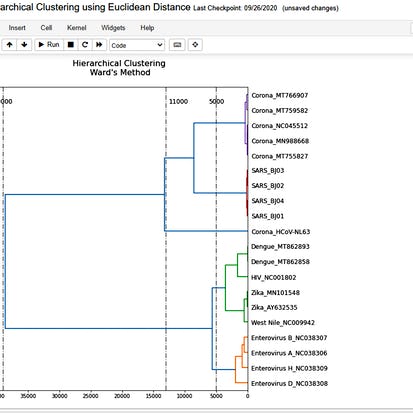
By the end of this project, you will create a Python program using a jupyter interface that analyzes a group of viruses and plot a dendrogram based on similarities among them. The dendrogram that you will create will depend on the cumulative skew profile, which in turn depends on the nucleotide composition. You will use complete genome sequences for many viruses including, Corona, SARS, HIV, Zika, Dengue, enterovirus, and West Nile viruses.Auto Summary
Unlock the power of data analysis with our "Hierarchical Clustering using Euclidean Distance" course, designed to enhance your skills in Personal Development. Guided by expert instructors from Coursera, this intermediate-level course will teach you how to craft a Python program using a Jupyter interface. Over a comprehensive 180-minute duration, you'll delve into the fascinating world of virus analysis, culminating in the creation and interpretation of a dendrogram that visualizes the similarities among different viruses. Best of all, this insightful journey into hierarchical clustering is available to you for free. Ideal for those with a foundational understanding of programming and data analysis, this course is perfect for learners looking to advance their analytical capabilities and apply them in real-world scenarios. Join us and elevate your data analysis expertise today!
Commercialise ton entreprise avec les marchandises de Canva
À la fin de ce projet, vous aurez toutes les compétences de base pour créer du contenu de marque et des marchandises de qualité en utilisant la plateforme Canva, outil en ligne de création et d’édition de visuels Marketing. Vous serez capable de créer de la marchandise personnalisable en utilisant les divers outils de conception, couleurs et graphiques proposés par Canva.
Buy Now Free

- Level Beginner
- المدة 3 ساعات hours
- الطبع بواسطة Coursera
-
Offered by
عن
À la fin de ce projet, vous aurez toutes les compétences de base pour créer du contenu de marque et des marchandises de qualité en utilisant la plateforme Canva, outil en ligne de création et d’édition de visuels Marketing. Vous serez capable de créer de la marchandise personnalisable en utilisant les divers outils de conception, couleurs et graphiques proposés par Canva.الوحدات
Votre parcours d'apprentissage
-
1
Readings
-
1
Plugin
-
1
Lab
-
1
Assignment
1
Assignment
- Testez votre compréhension du projet
1
Labs
- Commercialise ton entreprise avec les marchandises de Canva
1
Readings
- Vue d'ensemble du cours basé sur un projet
Auto Summary
Unlock your entrepreneurial potential with "Commercialise ton entreprise avec les marchandises de Canva," a dynamic course designed to empower you with essential branding and merchandise creation skills using Canva. Aimed at beginners in personal development, this 180-minute course offered by Coursera will guide you through the fundamentals of developing high-quality branded content and customizable merchandise. With the user-friendly tools, colors, and graphics available on Canva, you'll learn to craft visually appealing and professional marketing materials. Best of all, this course is accessible for free, making it an excellent opportunity for aspiring entrepreneurs and small business owners to enhance their marketing capabilities effortlessly. Join now and transform your branding approach with expert guidance and practical insights.